HOW PENNYKEPT WORKS

One receipt.
A little less
mental clutter.

Know what is at home, what needs buying and what needs your attention. Start with your next shop—not your entire pantry.

Explore without signing up · fictional sample data

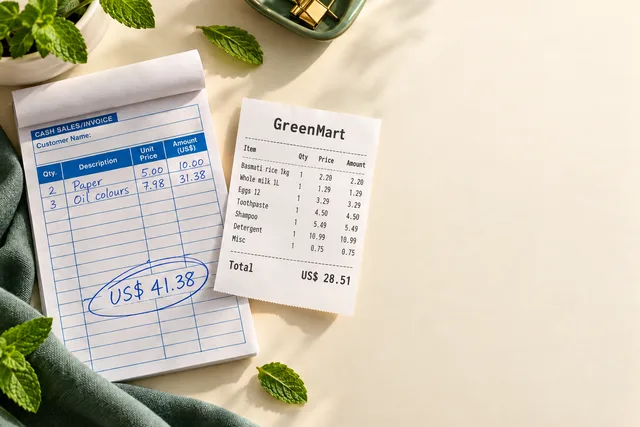
AI-created printed receipt and handwritten invoice props with fictional US-dollar amounts
Real PennyKept receipt review showing editable purchase lines
Paper → reviewable items

Real app screen · AI-created paper props

FOLLOW ONE SHOPPING TRIP

From bag on the counter
to a plan for the next shop.

Choose a step. See the actual screen and what you do next.

01 · Bring it home

The receipt does the typing.
You stay in control.

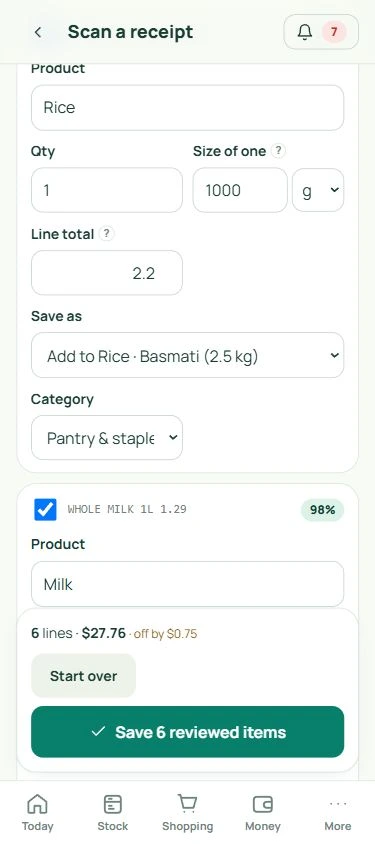
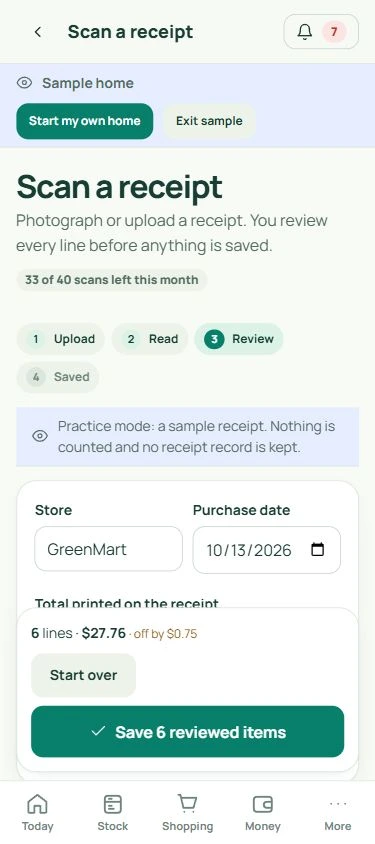
Photograph your next receipt, then check the suggested merchant, items, quantities and prices. Correct anything uncertain before confirming.

  • Review each suggested purchase line.
  • Keep the items you want to track.
  • Choose a new product or restock an existing one.

Confirmed purchases become your household record.
Explore this feature
Receipt review with actual editable fields; fictional sample data
Actual PennyKept · sample household Desktop ↗Mobile ↗

02 · Know what is there

A useful home inventory.
Without a pantry overhaul.

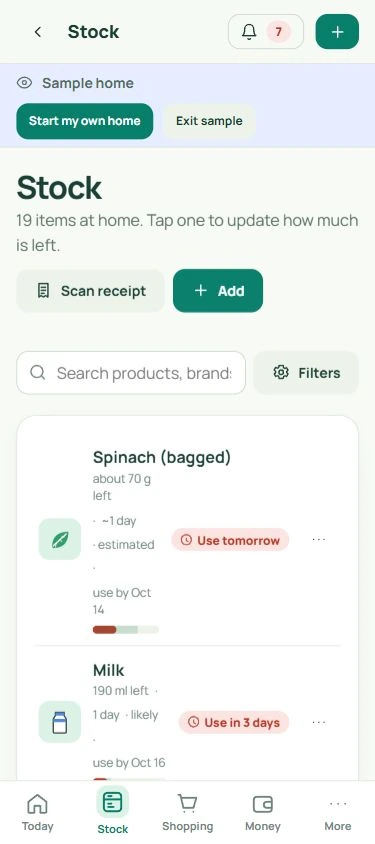
Your confirmed items sit together in Stock. Search for what you own and keep levels current with a quick check or a simple update.

  • Start with five things you buy regularly.
  • Keep quantity, location and label dates together.
  • Mark Full, Half, Nearly empty or Empty when useful.

Before the next shop, check the shelf from your phone.

Explore this feature
Actual Stock screen with sample household products; fictional sample data
Actual PennyKept · sample household Desktop ↗Mobile ↗

03 · Buy with a plan

One household.
One shared list.

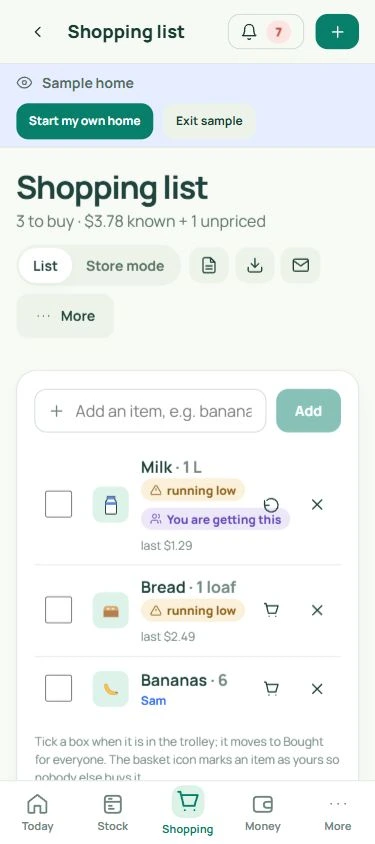
Add what you need to Shopping and share it with your household. Claim an item so everyone can see who is getting it.

  • Add a need manually or from Stock.
  • Claim an item for two hours to coordinate.
  • Use Store mode for large, easy-to-tap checkboxes.

A clearer next shop, with fewer messages to keep track of.

Explore this feature
Actual shared Shopping screen with a claimed item; fictional sample data
Actual PennyKept · sample household Desktop ↗Mobile ↗

04 · Keep the useful bits

A small check-in.
A clearer next step.

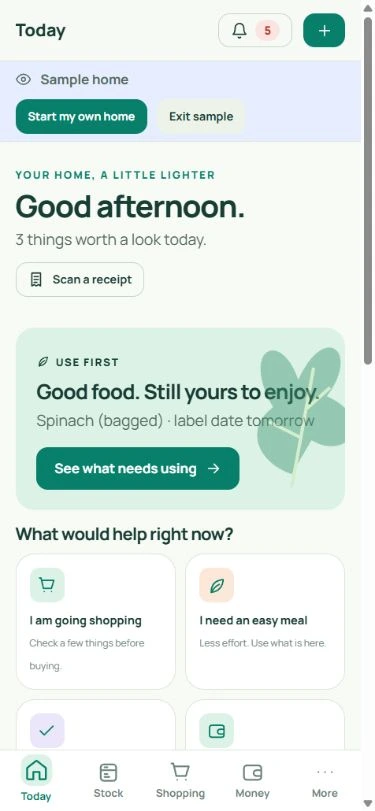
Come back to Today for the items needing attention. Use First helps you prioritize recorded dates; Money keeps recorded refunds and renewals in view.

  • Check which products need attention.
  • Update what you use or finish.
  • Follow up on a refund or renewal you have recorded.

A record that becomes more useful as you keep it current.

Explore this feature
Actual Today screen with household priorities; fictional sample data
Actual PennyKept · sample household Desktop ↗Mobile ↗

Prefer to type? Add a product manually or scan its barcode. You do not need a receipt to get started.

SMALL CHANGES, USEFUL DIFFERENCES

Make the everyday
“Did we…?” easier.

Here is where a shared record can help.

BEFORE THE SHOP
“Do we already have this?”

Check Stock before adding another.

A quick look at your recorded items helps you make the next buying decision.

See Stock ↗
IN THE AISLE
“I thought you were getting it.”

Claim it on the shared list.

The household can see who is getting an item, with a claim that lasts two hours.

See shared shopping ↗
AFTER THE PURCHASE
“Did that refund ever arrive?”

Keep the follow-up in Money.

Record a return, watch its status and confirm when the refund reaches you.

See returns & renewals ↗

YOUR FIRST FIVE

You do not need
to inventory your life.

Pick five things you buy often. A small record you use is more helpful than a big one you forget.

Start free, no card

Free: 30 active products · 3 receipt scans/month · sharing for 6 people. Compare plans ↗

A SIMPLE STARTING POINT
  • 01
    Something you buy weekly

    Milk, bread or your usual breakfast.

  • 02
    Something in the cupboard

    Rice, pasta or coffee.

  • 03
    Something in the bathroom

    Toothpaste or shampoo.

  • 04
    Something for cleaning

    Detergent or washing-up liquid.

  • 05
    Something you forget to replace

    Your household’s own repeat offender.

BEFORE YOU START

A few things to know.

Does scanning save everything automatically?

No. Receipt reading suggests purchase lines. You review the details, correct uncertain information and choose what to keep before saving. Scans count against your plan allowance.

What if I have a handwritten shopping list?

Shopping-note scanning creates a draft list for review. Receipt scanning creates purchase items. Check names, quantities and unclear words before adding the suggested items.

Do I have to update every item every day?

No. Start small and update levels when useful—when shopping, finishing a pack or doing a Quick Check. The record and any available forecasts depend on keeping your data reasonably current. Forecasts are estimates and are separate from product-label dates.

Does PennyKept cancel subscriptions or recover refunds for me?

No. It helps you track recorded returns and renewals and follow up. You cancel with the merchant and confirm outcomes in PennyKept. Potential savings are kept separate from money you have actually confirmed.

Can I use it on Android, iPhone and desktop?

Yes. Android has an APK download. iPhone and desktop use web-app installation. You can also use PennyKept in your browser. Open the installation guide ↗

START WITH YOUR NEXT SHOP

A little less remembering.
A little more room to breathe.

Explore the sample household first, or make a small start of your own.

Try the sample home Start your free home